Credential Theft Protection Guide (2026)
A practical guide to credential theft, password leaks, phishing attacks, and account protection strategies in 2026.
Updated May 2026Reviewed by Editorial TeamEditorial review
Quick Answer
A practical guide to credential theft, password leaks, phishing attacks, and account protection strategies in 2026. This guide explains the main benefits, risks, and practical steps readers need to stay secure online in 2026.
Quick Summary
- Credential theft usually starts with phishing or leaked passwords
- Password reuse massively increases account takeover risk
- 2FA reduces most credential attacks
- Password managers are the best long-term protection
Credential theft is one of the most common cyber threats in 2026.
Millions of passwords are stolen every year through phishing, malware, data breaches, and weak security habits.
Once attackers gain access to one account, they often try accessing many others automatically.
[[image:credential-theft|Credential theft and account hacking illustration]]What Is Credential Theft?
Credential theft happens when attackers steal login information such as:
- Email addresses
- Passwords
- Session cookies
- Authentication tokens
Stolen credentials are often sold online or used for account takeover attacks.
This may lead to:
- Identity theft
- Financial fraud
- Unauthorized purchases
- Social media hijacking
- Business account compromise
How Credential Theft Happens
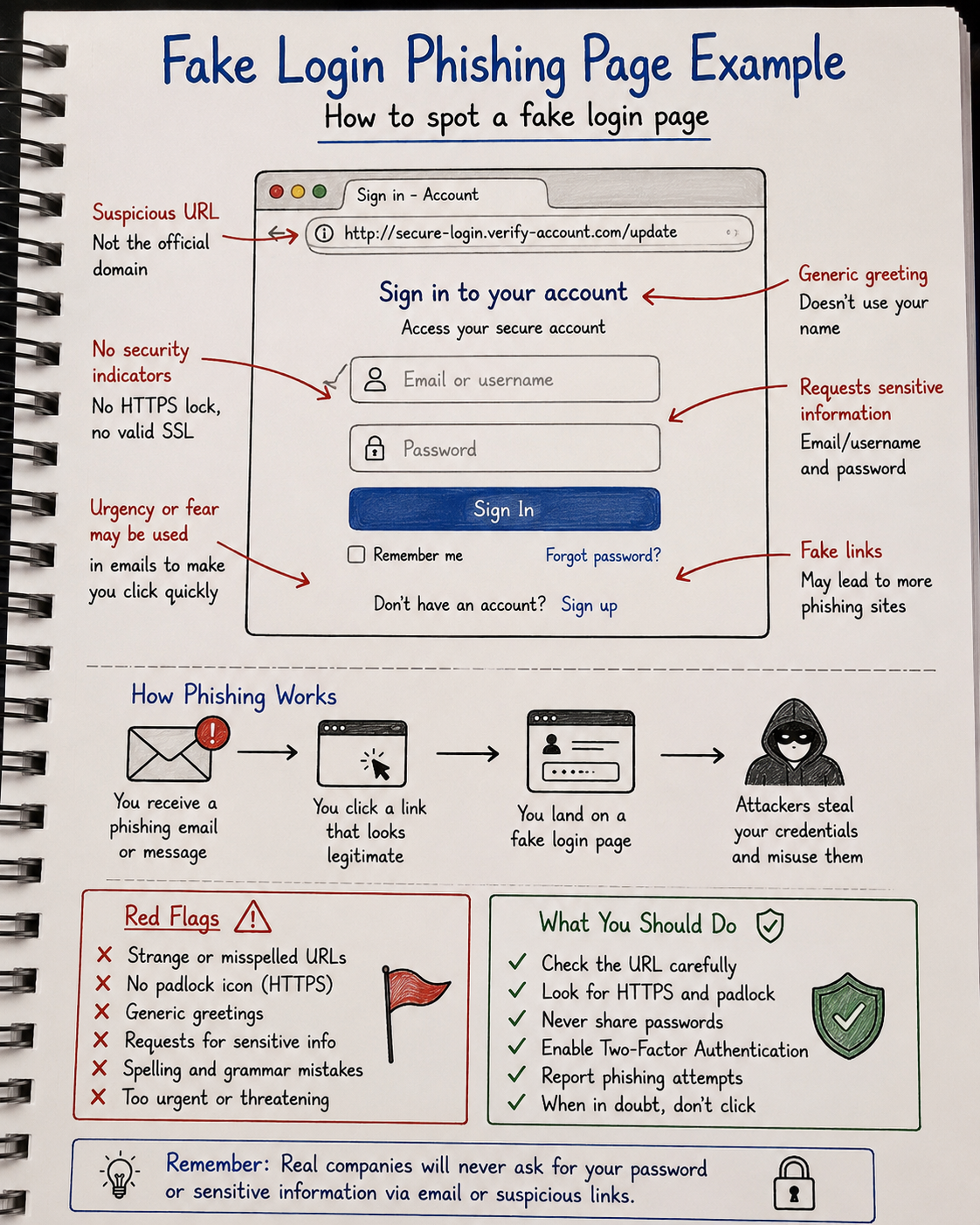
Most attacks do not involve sophisticated hacking.
Instead, cybercriminals exploit weak habits and human mistakes.
Common attack methods include:
- Phishing emails
- Fake login pages
- Password leaks
- Malware infections
- Credential stuffing attacks
Why Password Reuse Is Extremely Dangerous
Password reuse is one of the biggest causes of account compromise.
If one website suffers a data breach, attackers may attempt the same password on:
- Bank accounts
- Email providers
- Social media accounts
- Cloud storage
- Shopping websites
This is why using unique passwords is critical.
Most Common Credential Theft Attacks
| Attack Type | Goal | Risk |
|---|---|---|
| Phishing | Steal login credentials | High |
| Credential stuffing | Reuse leaked passwords | Very High |
| Keyloggers | Capture typed passwords | High |
| Fake login pages | Trick users into signing in | High |
| Malware | Steal browser credentials | Very High |
How To Protect Yourself
The good news is that most credential theft attacks are preventable.
Recommended protection steps:
- Use unique passwords for every account
- Enable two-factor authentication (2FA)
- Avoid suspicious links
- Keep devices updated
- Monitor breach alerts
- Use trusted password managers
Best Protection: Password Managers
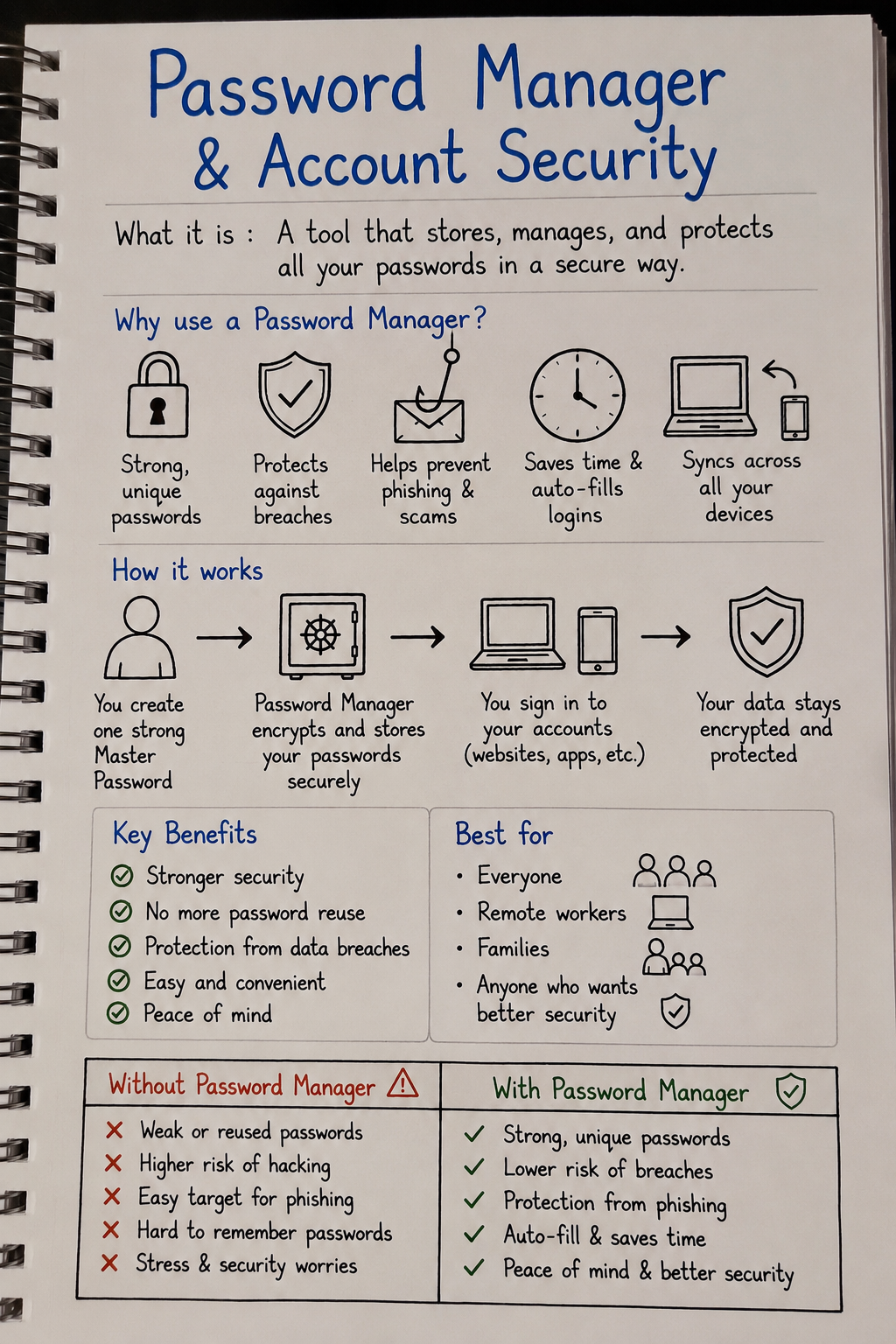
Password managers are one of the most effective cybersecurity tools available.
They help:
- Create strong passwords
- Prevent password reuse
- Store credentials securely
- Detect phishing websites
- Reduce human error
Should You Use 2FA?
Yes — two-factor authentication dramatically improves account security.
Even if attackers steal your password, 2FA adds an additional verification step.
Best options include:
- Authenticator apps
- Security keys
- Passkeys
SMS verification is better than nothing, but authenticator apps are safer.
Extra Protection: VPN Security
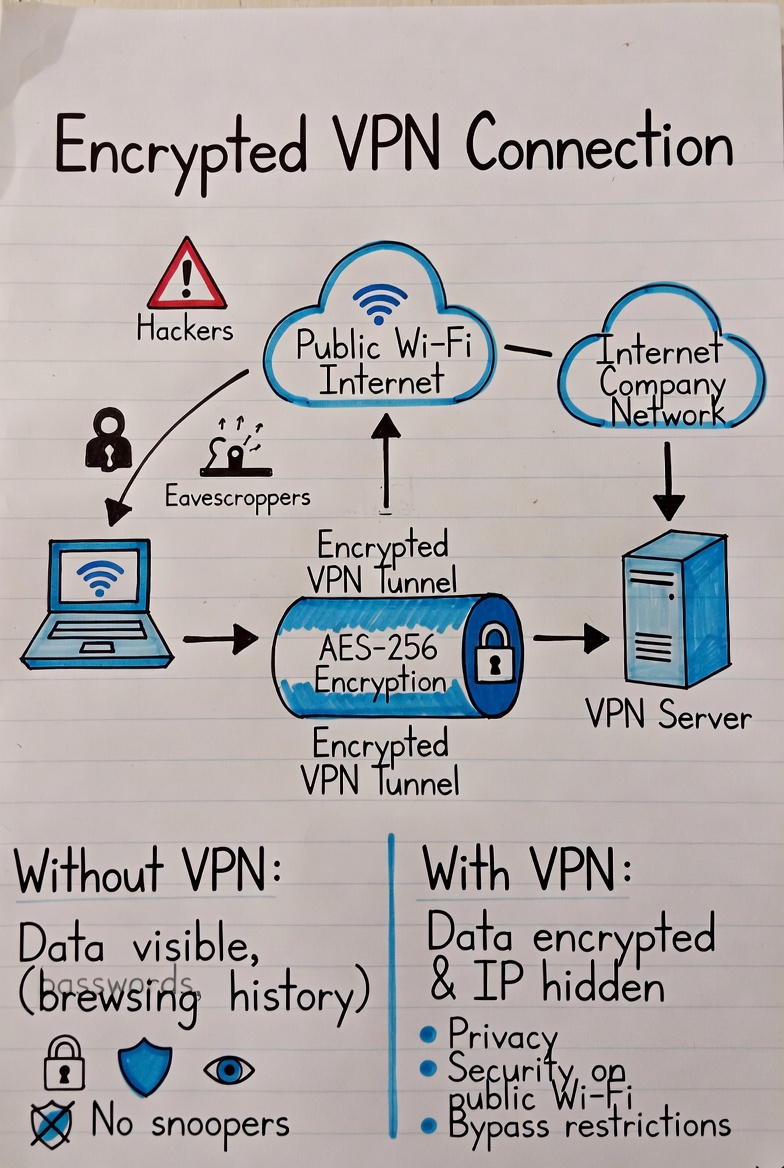
VPNs protect your internet traffic from interception, especially on public Wi-Fi networks.
This helps reduce risks from:
- Network sniffing
- Session hijacking
- Public Wi-Fi attacks
- Data interception
Warning Signs Your Credentials Were Stolen
- Unexpected password reset emails
- Unknown login notifications
- Locked accounts
- Unauthorized purchases
- Messages sent from your accounts
If you notice these signs, immediately change passwords and enable 2FA.
What To Do After a Data Breach
- Change affected passwords immediately
- Enable 2FA
- Check for reused passwords
- Monitor financial accounts
- Review login activity
Final Verdict
Credential theft is now one of the most common cyberattacks worldwide.
Most account compromises happen because of weak passwords, password reuse, or phishing attacks.
Using strong passwords, enabling 2FA, and adopting a password manager dramatically reduces your risk.
How We Evaluated This Guide
We evaluated this guide for security, privacy, usability, pricing, features, and real-world usefulness so readers can make better decisions.
Alternative Options
We also compare this topic with relevant alternatives to help you decide whether it is the best choice for your needs.
Common Security Myths
Myth
iPhones cannot get malware.
Reality
iPhones are harder to compromise than many devices, but phishing, malicious profiles, scam apps, and account takeover still affect iOS users.
Myth
Android is automatically insecure.
Reality
Modern Android can be secure when updated, locked down, and used with trusted apps from reputable sources.
What Security Experts Recommend
- Use a reputable password manager for unique passwords and secure vault storage.
- Adopt passkeys on important accounts when available, but keep recovery methods protected.
- Enable two-factor authentication, preferably with an authenticator app or security key.
- Install operating system, browser, and app updates promptly.
- Review app permissions, browser extensions, and account recovery options every few months.
Best Security Tools

Bitdefender
Malware protection and device security
9.5

NordPass
Password managers, passkeys, secure sharing
9.3

NordVPN
VPN privacy, public Wi-Fi, streaming
9.6

Incogni
Personal data removal and broker opt-outs
9.2
Frequently Asked Questions
What is Credential Theft Protection Guide (2026)?
Credential Theft Protection Guide (2026) is a practical guide that explains the main benefits, risks, and best practices for using security tool technology safely.
How does Credential Theft Protection Guide (2026) help protect privacy?
This guide highlights how Credential Theft Protection Guide (2026) reduces tracking, secures personal data, and helps you stay safe online.
Who should read this guide?
This guide is useful for beginners and experienced users who want clear advice on security, privacy, and practical online protection.
What are the main risks covered in this guide?
The guide covers common risks such as unsecured Wi-Fi, weak passwords, data leaks, and privacy exposures.
What should I do after reading this guide?
After reading, use the recommended steps and tools to improve your online privacy, strengthen passwords, and secure your devices.
