What Is Phishing? Beginner’s Guide to Phishing Scams (2026)
A beginner-friendly guide explaining phishing attacks, fake emails, scam websites, credential theft, and how to stay safe online.
Key Insight
A beginner-friendly guide explaining phishing attacks, fake emails, scam websites, credential theft, and how to stay safe online.
Quick Summary
- Phishing attacks trick users into revealing sensitive information
- Fake emails and websites often imitate trusted companies
- Phishing commonly targets passwords and banking details
- 2FA and password managers help reduce phishing risks
Phishing is one of the most common and dangerous cyber threats online.
Cybercriminals use phishing attacks to trick people into revealing passwords, banking information, verification codes, and other sensitive data.
Modern phishing scams often look identical to legitimate emails and websites from trusted companies like PayPal, Netflix, Microsoft, or banks.
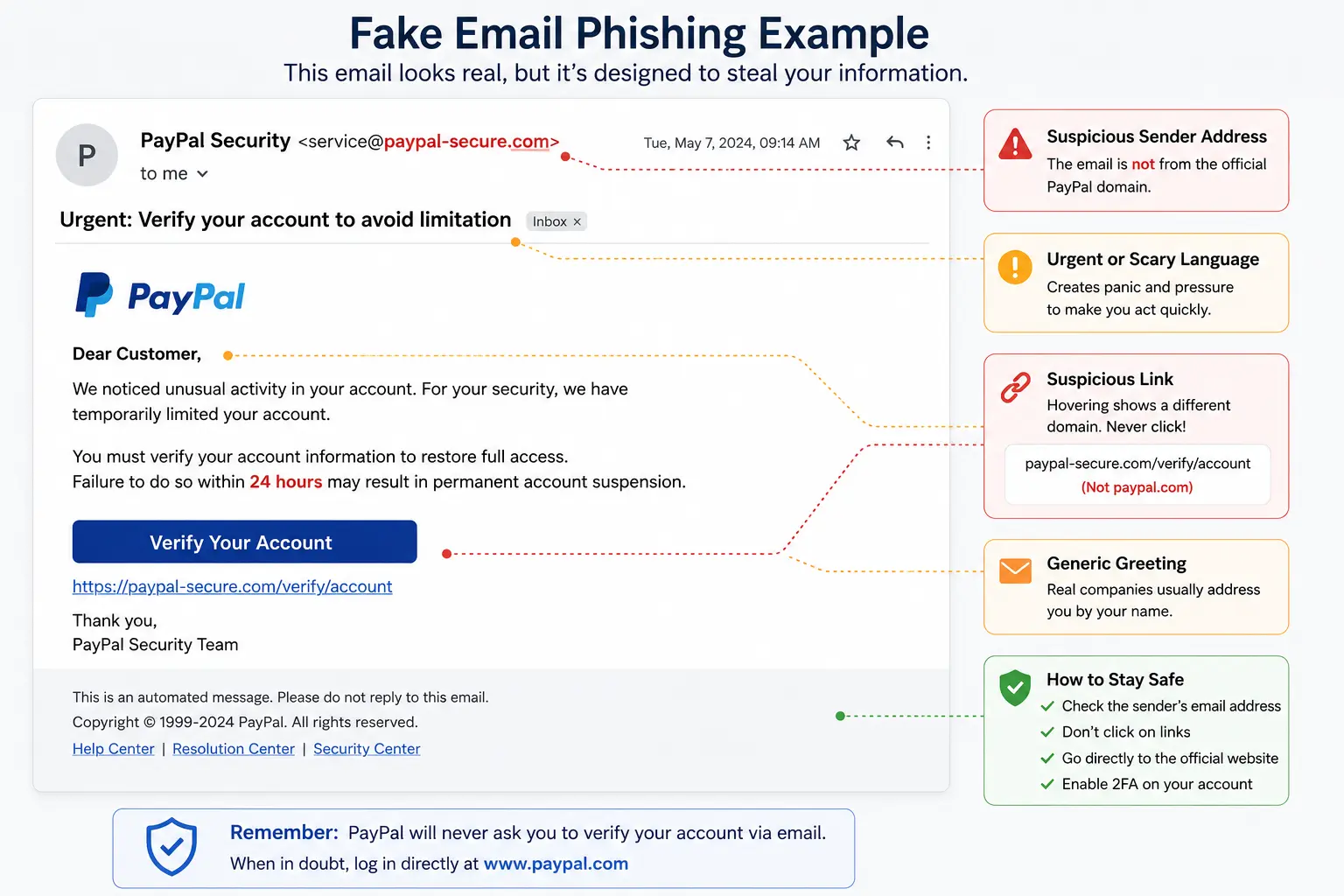
[[image:fake-email|Phishing email pretending to be a trusted company]]What Is Phishing?
Phishing is a type of cyberattack where attackers impersonate trusted companies, websites, or individuals to steal sensitive information.
Attackers commonly attempt to steal:
- Passwords
- Credit card details
- Banking information
- Verification codes
- Personal information
Most phishing attacks use fake emails, fake login pages, text messages, or malicious links.
How Phishing Works
Most phishing attacks follow a similar process.
- The attacker creates a fake email, message, or website
- The victim receives a warning, urgent request, or fake notification
- The victim clicks a malicious link
- The fake website steals login credentials or financial information
- The attacker uses the stolen data for fraud or account takeover
Warning Signs of Phishing
Most phishing attacks share common warning signs.
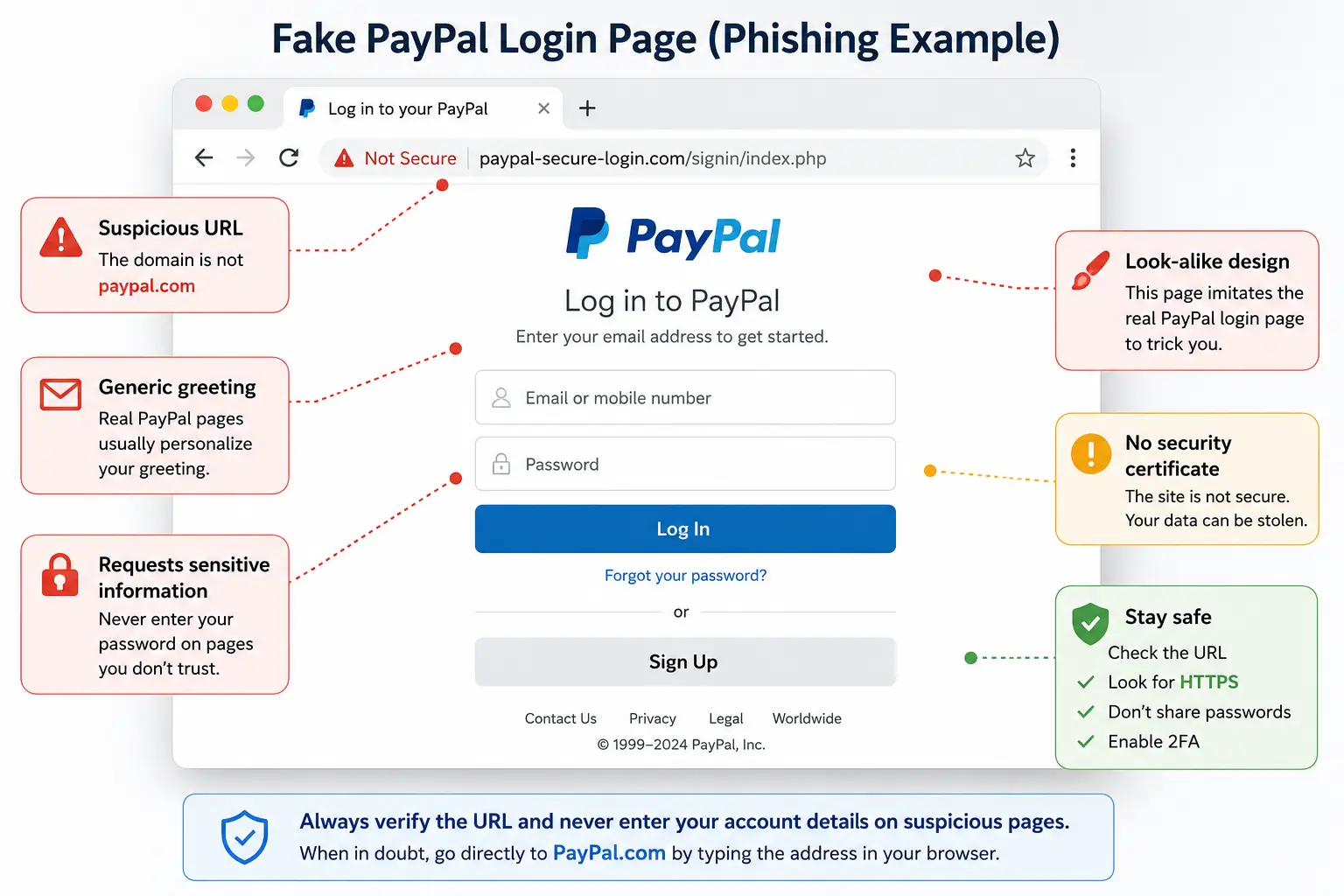
[[image:fake-login|Fake login page designed to steal passwords]]- Urgent or threatening language
- Suspicious links or domains
- Spelling and grammar mistakes
- Unexpected attachments
- Requests for passwords or verification codes
Common Types of Phishing Attacks
Email Phishing
Email phishing is the most common type of phishing attack.
Attackers send fake emails pretending to be:
- Banks
- Streaming services
- Delivery companies
- Tech support
- Government agencies
SMS Phishing (Smishing)
Smishing uses fake text messages to trick users into clicking malicious links.
Common examples include:
- Fake delivery notifications
- Bank security alerts
- Prize scams
- Tax refund scams
Voice Phishing (Vishing)
Vishing attacks use phone calls pretending to be:
- Bank support
- Police
- Government agencies
- Technical support
Attackers attempt to manipulate victims into sharing sensitive information.
Spear Phishing
Spear phishing targets specific individuals or companies using personalized information.
These attacks are often more convincing and dangerous.
Fake Websites and Login Pages
Many phishing attacks use fake websites designed to steal credentials.
These websites often copy:
- Company logos
- Login forms
- Brand colors
- Official layouts
Some phishing websites are nearly impossible to distinguish from legitimate websites at first glance.
How Phishing Leads to Account Theft
Once attackers steal passwords, they often attempt:
- Credential stuffing attacks
- Email account takeovers
- Bank fraud
- Identity theft
- Social media hijacking
Reusing passwords across multiple websites makes phishing even more dangerous.
How To Protect Yourself From Phishing
| Protection Method | Why It Helps |
|---|---|
| 2FA | Protects accounts even if passwords are stolen |
| Password Manager | Helps identify fake websites and prevents password reuse |
| Antivirus | Can block malicious websites and downloads |
| Email Verification | Helps detect fake senders and suspicious domains |
How 2FA Helps Against Phishing
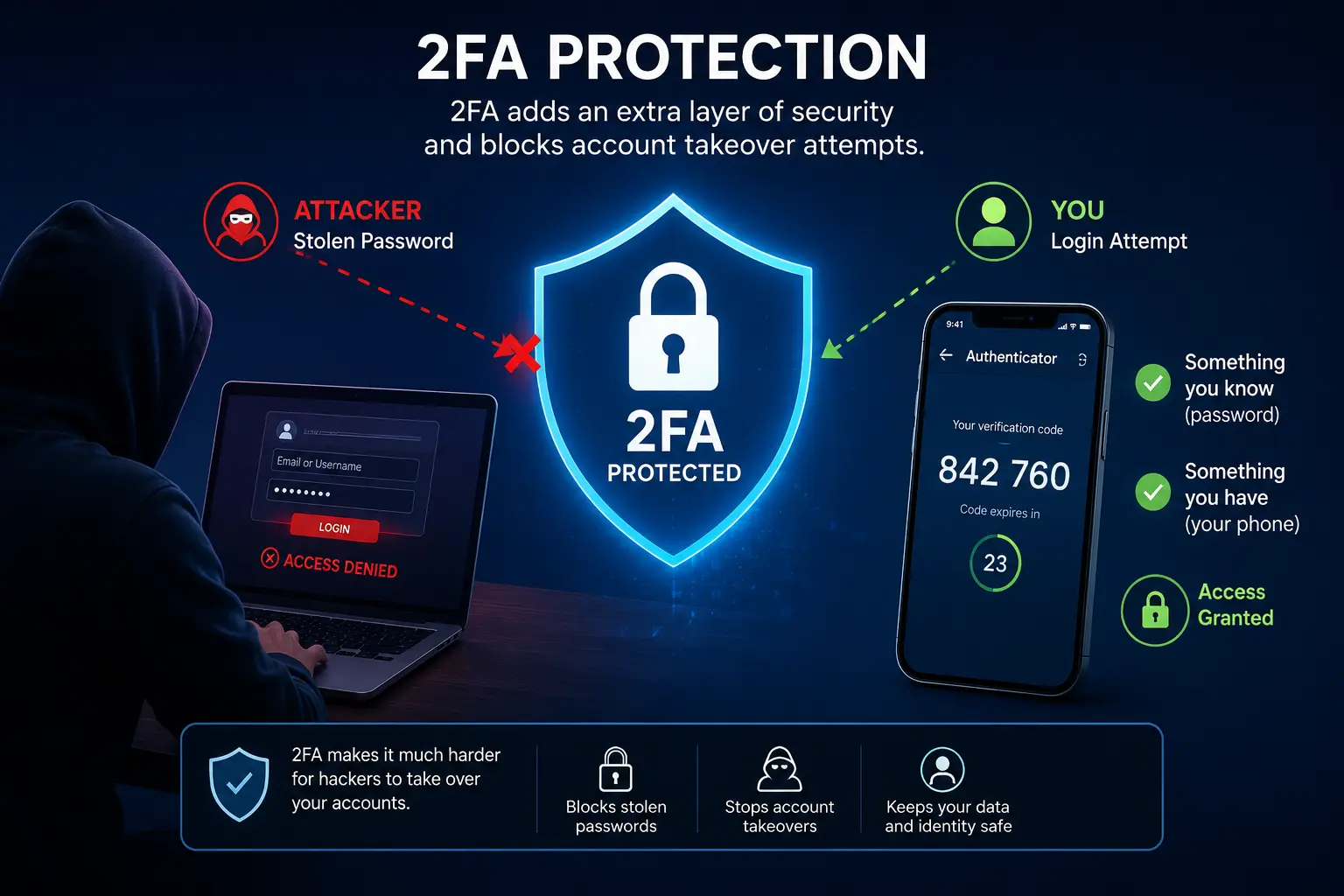
Two-factor authentication (2FA) adds an additional security layer beyond passwords.
Even if attackers steal your password, 2FA can block unauthorized logins.
Common Phishing Mistakes People Make
- Clicking links too quickly
- Ignoring suspicious domains
- Reusing passwords
- Entering codes into fake websites
- Trusting urgent messages without verification
Most phishing attacks rely on panic, urgency, or emotional manipulation.
Can Phishing Be Automated?
Yes. Modern phishing campaigns are heavily automated.
Attackers now use:
- Mass email campaigns
- AI-generated phishing messages
- Automated fake login pages
- Credential harvesting tools
- Malware distribution systems
AI-generated phishing scams are becoming more realistic and harder to detect.
Common Questions About Phishing
Can phishing steal bank accounts?
Yes. Phishing attacks often target banking credentials and financial information.
Can phishing bypass 2FA?
Some advanced phishing attacks may attempt to steal temporary verification codes, but 2FA still blocks most account takeover attempts.
What should I do if I clicked a phishing link?
You should immediately change your passwords, enable 2FA, and scan your device for malware.
Are phishing emails always obvious?
No. Modern phishing emails can look extremely convincing and may closely imitate legitimate companies.
Final Verdict
Phishing attacks remain one of the biggest cybersecurity threats in 2026.
Understanding how phishing works is essential for protecting your accounts, finances, and personal information.
Using strong passwords, enabling 2FA, and staying cautious online dramatically reduces your risk of becoming a phishing victim.

Sandro C.
Verified ExpertFounder & Cybersecurity Researcher at StaySecureHub
At StaySecureHub, he tests and compares services based on security, performance, and transparency, helping users make informed decisions to protect their online lives.