
Bitwarden is one of the strongest password managers in 2026 for users who want security, transparency, and excellent value.
It is especially popular with people looking for a free password manager, an open-source password manager, and a secure way to store passwords, passkeys, secure notes, and sensitive logins across devices.
In this Bitwarden review, we look at its free plan, Premium plan, security model, passkey support, password sharing, pricing, family features, small business use, pros, cons, and how it compares with NordPass, 1Password, Keeper, and browser-based password managers.
Quick Verdict
Bitwarden is one of the best free password managers in 2026. It offers unlimited password storage, unlimited device sync, strong encryption, open-source transparency, password generation, secure notes, passkey support, and affordable paid upgrades.
The main weakness is usability. Bitwarden is not difficult to use, but its interface feels more practical than premium. Beginners may find NordPass or 1Password more polished, especially for family sharing and onboarding.
Bitwarden at a Glance
- Best for: users who want a free, secure, open-source password manager
- Free plan: unlimited passwords and unlimited devices
- Premium: from $1.65/month, billed annually
- Families: from $3.99/month, billed annually
- Security model: end-to-end encryption and zero-knowledge architecture
- Passkeys: supported
- Main strength: value, transparency, and security
- Main drawback: less polished interface than NordPass or 1Password
Bitwarden Rating
- Security: 9.4/10
- Features: 9.0/10
- Ease of use: 8.4/10
- Price: 9.5/10
- Privacy: 9.3/10
Who Is Bitwarden Best For?
- Users looking for one of the best free password managers
- People who want an open-source password manager
- Students, freelancers, and budget-conscious users
- Families that want secure password sharing at a reasonable price
- Small teams that need simple password management
- Users who want to move away from saving passwords only in Chrome, Edge, Firefox, or Safari
- Security-focused users who want transparency and strong encryption
Who Should Avoid Bitwarden?
Bitwarden may not be the best option if you want the most polished interface, the easiest family onboarding, or a password manager that feels very beginner-focused from the first screen.
If design, guided setup, and simplicity matter more than open-source transparency or free-plan value, NordPass or 1Password may feel easier to recommend.
How Does Bitwarden Work?
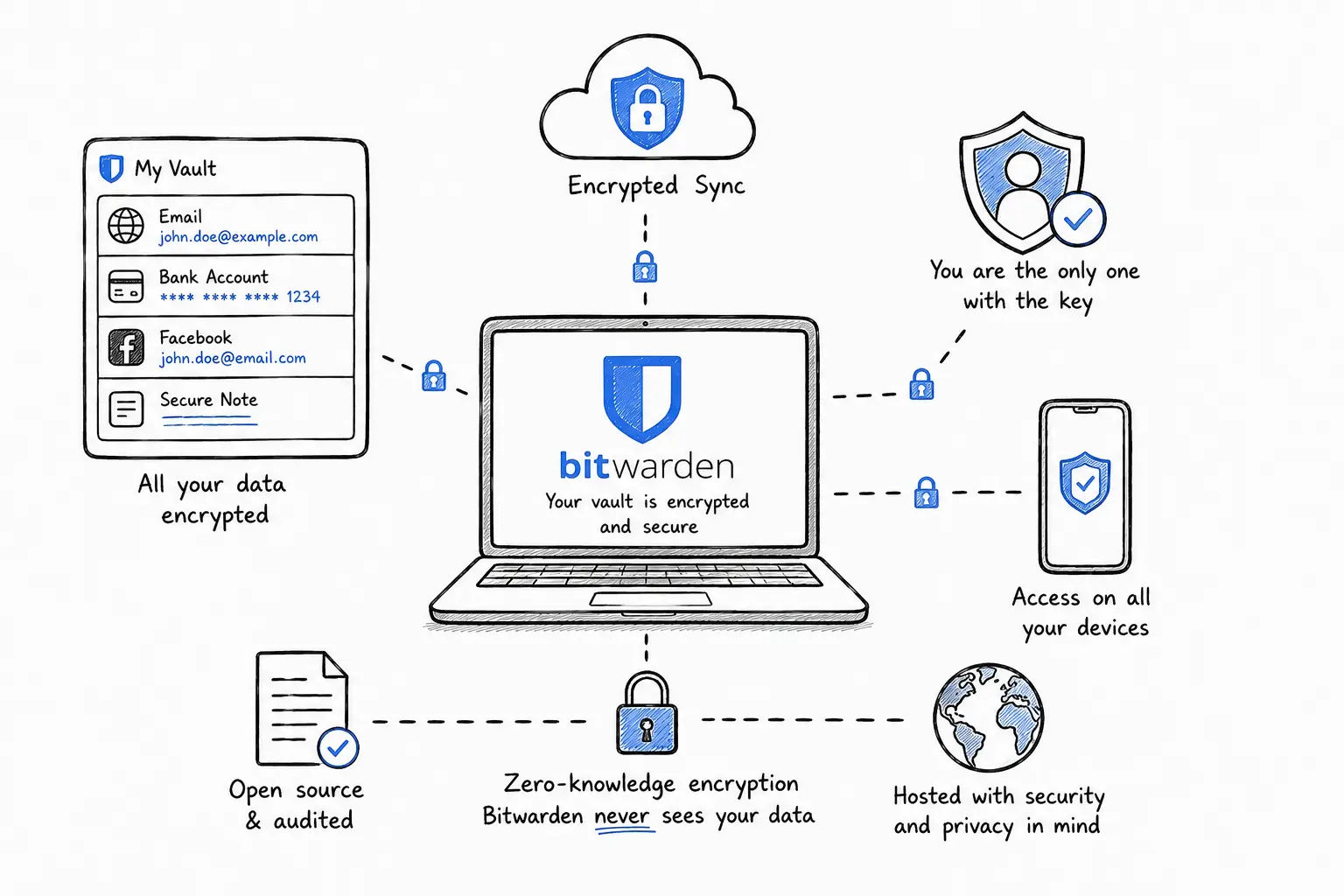
Bitwarden stores your passwords, passkeys, secure notes, payment cards, identities, and other sensitive information inside an encrypted vault.
Your data is encrypted before it is synchronized across devices. This means your vault is designed to remain protected even when it is stored in the cloud.
Bitwarden uses a zero-knowledge model, meaning Bitwarden should not be able to read your saved passwords or vault contents. Your master password is used to unlock the encrypted vault, so choosing a strong and unique master password is essential.
👉 Related: What Is a Password Manager?
Is Bitwarden Safe?
Yes. Bitwarden is considered one of the safest password managers available in 2026, especially for users who want open-source transparency and strong encryption.
Bitwarden uses end-to-end encryption and zero-knowledge encryption. In simple terms, your vault data is encrypted so that only you can unlock it with your master password.
The most important practical security step is to protect your Bitwarden account with a long master password and two-factor authentication.
👉 Related: Online Account Security Guide
Bitwarden Security Features
- End-to-end encrypted password vault
- Zero-knowledge architecture
- Open-source applications
- Password generator
- Passphrase generator
- Secure notes
- Two-factor authentication support
- Integrated authenticator features on paid plans
- Emergency access on paid plans
- Vault health reports on paid plans
- Secure sharing through organizations
- Browser extensions and mobile apps
- Passkey storage and passwordless authentication support
👉 Related: How Hackers Steal Passwords
Is Bitwarden Open Source?
Yes. Bitwarden is an open-source password manager. This is one of the biggest reasons security-focused users trust it.
Open-source software does not automatically mean perfect security, but it does allow the code to be inspected, reviewed, and audited more openly than closed-source tools.
For users who care about transparency, this is a major advantage over many competing password managers.
Does Bitwarden Support Passkeys?
Yes. Bitwarden supports passkeys and passwordless authentication workflows.
Passkeys are designed to reduce reliance on traditional passwords. Instead of typing a password that can be stolen, guessed, reused, or phished, passkeys use cryptographic authentication.
This makes passkeys one of the most important security improvements for online accounts. Bitwarden can help users store and sync passkeys across devices while still managing traditional passwords.
👉 Related: How to Protect Online Accounts
Bitwarden Free Plan
The free plan is one of Bitwarden's biggest advantages.
Unlike many password managers that restrict the number of stored passwords or supported devices, Bitwarden gives individual users unlimited password storage and unlimited device access.
For many users, the free plan is enough to replace unsafe habits such as reusing passwords, saving passwords only in the browser, storing logins in notes, or keeping credentials in spreadsheets.
👉 Related: Best Free Password Managers
Bitwarden Premium Review
Bitwarden Premium is designed for users who want extra security features without paying a high subscription price.
Premium adds features such as integrated authenticator support, emergency access, encrypted file attachments, security reports, and additional account protection tools.
For users who only need basic password storage and password generation, the free plan may be enough. But if you want stronger account protection, Premium is worth considering.
Bitwarden Pricing and Plans
Bitwarden is still one of the best-value password managers, although its paid pricing should be checked before purchase because subscription prices can change.
| Plan | Price | Best for |
|---|---|---|
| Free | $0 | Basic password management |
| Premium | From $1.65/month, billed annually | Extra security features |
| Families | From $3.99/month, billed annually | Households and shared logins |
| Teams | Business pricing | Small teams and companies |
| Enterprise | Business pricing | Larger organizations |
Can You Share Passwords With Bitwarden?
Yes. Bitwarden allows secure password sharing through Organizations and shared collections.
This is safer than sending passwords through email, WhatsApp, Slack, spreadsheets, or documents. Shared credentials remain managed inside an encrypted password management system.
Password sharing is useful for families, freelancers, agencies, and small teams that need access to shared accounts without exposing credentials in unsafe places.
Is Bitwarden Good for Families?
Yes. Bitwarden Families is a strong option for households that want secure password sharing at a reasonable price.
Families can use shared collections for streaming services, subscriptions, bills, household accounts, and other shared logins.
The value is very good, but the setup may feel slightly less polished than 1Password or NordPass. For technical users or security-focused families, Bitwarden is excellent. For less technical households, NordPass or 1Password may feel easier.
Bitwarden for Teams and Small Businesses
Bitwarden can also work well for small businesses, freelancers, startups, and agencies.
Teams can use Bitwarden to reduce password reuse, manage shared credentials, control access, and improve basic security hygiene across the organization.
- Secure password sharing
- User management
- Collections for organizing shared credentials
- Role-based permissions
- Activity and access controls on business plans
- Support for stronger authentication workflows
For larger companies, features such as SSO, directory integration, admin policies, and enterprise controls may become more important.
Bitwarden vs Saving Passwords in Your Browser
Saving passwords in Chrome, Edge, Firefox, or Safari is convenient, but it is usually not the best long-term password security strategy.
A dedicated password manager like Bitwarden gives you better organization, stronger password generation, secure notes, safer sharing, cross-browser access, and more security controls.
If most of your passwords are currently saved in a browser, moving them to Bitwarden can be a meaningful security upgrade.
👉 Related: Password Manager vs Browser Password Storage
Bitwarden vs Google Password Manager
Google Password Manager is convenient for Chrome and Android users, but Bitwarden is more complete as a dedicated password manager.
Bitwarden works across multiple browsers, supports secure sharing, stores secure notes, supports passkeys, offers paid security reports, and gives users more flexibility outside the Google ecosystem.
Google Password Manager is fine for simple use, but Bitwarden is better for users who want stronger control and a more independent password vault.
Bitwarden vs NordPass
Bitwarden is usually the better choice for users who want the strongest free plan, open-source transparency, and excellent long-term value.
NordPass is often better for beginners who want a cleaner interface, simpler onboarding, and a more polished everyday experience.
If your priority is value and transparency, choose Bitwarden. If your priority is simplicity and design, NordPass may feel easier.
👉 Related: Read our NordPass Review
Bitwarden vs 1Password
Bitwarden is more affordable and offers a much stronger free plan than 1Password.
1Password, however, has one of the most polished user experiences in the password manager market. It is particularly strong for families, teams, travel mode, and guided setup.
Choose Bitwarden if you want excellent value and open-source transparency. Choose 1Password if you want a premium experience and are comfortable paying more.
👉 Related: Compare the best password managers
Bitwarden vs NordPass vs 1Password
| Feature | Bitwarden | NordPass | 1Password |
|---|---|---|---|
| Free plan | Excellent | Limited | No free plan |
| Open-source | Yes | No | No |
| Ease of use | Good | Very good | Very good |
| Best for | Value and transparency | Beginners | Families and teams |
| Main weakness | Less polished interface | Free plan limits | Higher cost |
Bitwarden Pros and Cons
The biggest advantage of Bitwarden is value. It gives users strong password security, open-source transparency, and useful features without forcing an expensive subscription.
The free plan is excellent, and the paid plans are still competitive compared with many premium password managers.
The main drawback is usability. Bitwarden is secure and powerful, but its interface is not as smooth as some alternatives.
Common Bitwarden Complaints
- The interface can feel basic compared with premium competitors
- Some settings are too technical for casual users
- Family sharing may require more setup than NordPass or 1Password
- Autofill may need adjustment depending on browser or device
- Some of the best security tools require Premium
Is Bitwarden Worth Paying For?
Yes, Bitwarden Premium is worth paying for if you want extra security features such as integrated authenticator support, emergency access, encrypted file attachments, security reports, and stronger account protection.
However, if you only need password storage, password generation, and basic autofill, the free plan may already be enough.
Best Alternatives to Bitwarden
The best Bitwarden alternative depends on what you value most.
- NordPass: better for beginners and users who want a cleaner interface.
- 1Password: better for families, teams, and users who want a premium experience.
- Keeper: strong for business and advanced security use cases.
- Google Password Manager: convenient, but less complete than a dedicated password manager.
👉 Related: Read our NordPass review
How We Evaluated Bitwarden
This Bitwarden review considers the factors that matter most for real-world password security.
- Security architecture
- Encryption model
- Open-source transparency
- Free plan value
- Premium features
- Passkey support
- Password sharing
- Family and small business use
- Ease of use
- Pricing and long-term value
- Comparison with NordPass, 1Password, Keeper, and browser password managers
Why Trust This Review?
StaySecureHub focuses on practical cybersecurity advice for everyday users, families, freelancers, and small teams.
Our goal is to help users choose tools that improve real online safety without unnecessary complexity or fear-based marketing.
This review is based on Bitwarden's public product information, security model, pricing, feature set, usability, and how it compares with other popular password managers.
Final Verdict
Bitwarden is one of the best password managers in 2026, especially for users who want a free or low-cost solution with strong security, open-source transparency, passkey support, and reliable cross-device password management.
It is not the most visually polished option, but it offers excellent value and strong protection for individuals, families, and small teams.
If you want the best balance between price, security, transparency, and features, Bitwarden remains one of the easiest password managers to recommend.
Should You Use Bitwarden?
Yes, if you want one of the best free password managers with strong security and low long-term cost, Bitwarden is an excellent choice in 2026.
Choose Bitwarden if you care about open-source transparency, unlimited password storage, passkeys, secure sharing, and strong value.
Choose NordPass or 1Password instead if you prefer a more polished, beginner-friendly interface and are willing to pay more for simplicity.