Secure Online Shopping Guide (2026)
A complete guide to secure online shopping, avoiding scams, and protecting your payment information online.
Updated April 2026Reviewed by StaySecureHub Editorial TeamEditorial review
Quick Answer
A complete guide to secure online shopping, avoiding scams, and protecting your payment information online. This guide explains the main benefits, risks, and practical steps readers need to stay secure online in 2026.
Quick Summary
- Fake stores and phishing scams are increasing
- Always verify shopping websites before buying
- Avoid suspicious payment requests
- Use secure payment methods and strong account protection
Online shopping is more convenient than ever — but cybercriminals are exploiting it aggressively in 2026.
Fake stores, phishing attacks, refund scams, and stolen payment information are now some of the most common online threats.
Fortunately, most shopping scams are preventable with a few simple security habits.
Most Common Online Shopping Scams
| Scam Type | Goal | Risk |
|---|---|---|
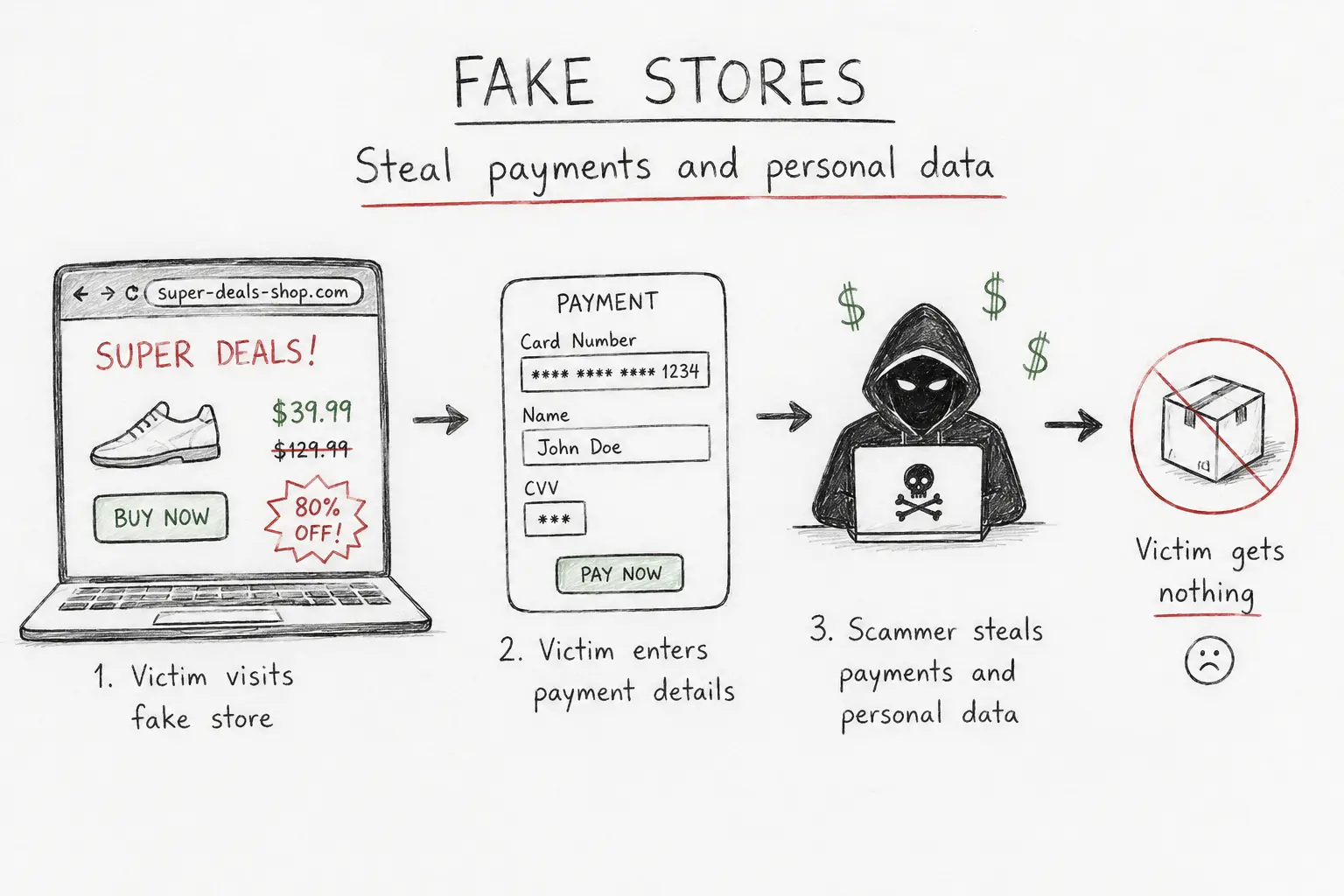
| Fake stores | Steal payments and personal data | High |
| Fake tracking messages | Phishing and malware | High |
| Refund scams | Financial fraud | High |
| Counterfeit products | Fake or low-quality goods | Medium |
| Card theft | Steal banking information | Very High |
How Fake Shopping Websites Work
[[image:fake-store|Fake online shopping website example]]Scammers increasingly create professional-looking stores that appear legitimate.
These fake websites often include:
- Huge discounts that seem unrealistic
- Fake reviews
- Urgency countdown timers
- Copied branding from real companies
Once victims enter payment details, attackers may:
- Steal credit card information
- Commit identity fraud
- Sell personal data
- Never ship products
Warning Signs of Unsafe Shopping Websites
- Prices far below normal market value
- Poor grammar or suspicious design
- Recently created domains
- No company information
- Only cryptocurrency or bank transfer payments
- Fake urgency messages
Phishing Attacks Targeting Online Shoppers
[[image:shopping-phishing|Online shopping phishing attack illustration]]Many attacks happen after the purchase.
Victims commonly receive:
- Fake delivery notifications
- Package tracking scams
- Refund requests
- Payment verification emails
These messages often contain malicious links designed to steal:
- Passwords
- Banking information
- Credit card details
- Personal data
👉 Related: How to avoid phishing attacks
Safest Payment Methods for Online Shopping
Some payment methods provide significantly better fraud protection.
Safer Options
- Credit cards
- Virtual cards
- PayPal
- Trusted payment gateways
Riskier Options
- Bank transfers
- Cryptocurrency payments
- Gift cards
- Direct payment requests via messaging apps
How To Shop Online Safely
- Verify the website domain carefully
- Use strong passwords
- Enable two-factor authentication (2FA)
- Avoid clicking shopping links in SMS messages
- Monitor bank statements regularly
- Use secure payment methods
👉 Related: How to protect your online accounts
Use a VPN on Public Wi-Fi
[[image:secure-shopping-vpn|VPN protection during online shopping]]Shopping on public Wi-Fi networks can expose your data to attackers.
A VPN encrypts your traffic and helps protect:
- Payment information
- Login credentials
- Shopping activity
- Personal data
How To Check If an Online Store Is Legitimate
- Search for independent reviews
- Check domain age
- Verify HTTPS encryption
- Look for real contact information
- Search for scam reports online
Legitimate stores are usually transparent about:
- Company details
- Returns and refunds
- Shipping information
- Customer support
What To Do If You Were Scammed
- Contact your bank immediately
- Freeze or replace affected cards
- Change compromised passwords
- Enable 2FA on important accounts
- Report the scam website
Fast action can reduce financial damage significantly.
Final Verdict
Online shopping scams are becoming increasingly sophisticated in 2026.
Most threats can be avoided by verifying websites carefully, using secure payments, and avoiding suspicious links.
Simple security habits dramatically reduce your risk while shopping online.
How We Evaluated This Guide
We evaluated this guide for security, privacy, usability, pricing, features, and real-world usefulness so readers can make better decisions.
Alternative Options
We also compare this topic with relevant alternatives to help you decide whether it is the best choice for your needs.
Common Security Myths
Myth
iPhones cannot get malware.
Reality
iPhones are harder to compromise than many devices, but phishing, malicious profiles, scam apps, and account takeover still affect iOS users.
Myth
Android is automatically insecure.
Reality
Modern Android can be secure when updated, locked down, and used with trusted apps from reputable sources.
What Security Experts Recommend
- Use a reputable password manager for unique passwords and secure vault storage.
- Adopt passkeys on important accounts when available, but keep recovery methods protected.
- Enable two-factor authentication, preferably with an authenticator app or security key.
- Install operating system, browser, and app updates promptly.
- Review app permissions, browser extensions, and account recovery options every few months.
Best Security Tools

Bitdefender
Malware protection and device security
9.5

NordPass
Password managers, passkeys, secure sharing
9.3

NordVPN
VPN privacy, public Wi-Fi, streaming
9.6

Incogni
Personal data removal and broker opt-outs
9.2
Frequently Asked Questions
What is Secure Online Shopping Guide (2026)?
Secure Online Shopping Guide (2026) is a practical guide that explains the main benefits, risks, and best practices for using security tool technology safely.
How does Secure Online Shopping Guide (2026) help protect privacy?
This guide highlights how Secure Online Shopping Guide (2026) reduces tracking, secures personal data, and helps you stay safe online.
Who should read this guide?
This guide is useful for beginners and experienced users who want clear advice on security, privacy, and practical online protection.
What are the main risks covered in this guide?
The guide covers common risks such as unsecured Wi-Fi, weak passwords, data leaks, and privacy exposures.
What should I do after reading this guide?
After reading, use the recommended steps and tools to improve your online privacy, strengthen passwords, and secure your devices.